Play the daily class
Open Daily class for a 50-second lesson. Every player gets the same teacher, snack order, patrol timetable and noise cover for that UTC date. Courses rotate through math, choir, silent reading, science, dictation and art, with different safe windows and a target of 5–7 portions. Your first finished result and personal best stay on this browser. Practice the same lesson again, copy your first result to compare with a friend, and return after 00:00 UTC for the next class.
Hold long enough to reach past your book before you eat. Quick taps do not finish a bite. Release to tuck the snack away. In a quiet classroom, a crunchy snack or wrapper can make the teacher stop and turn toward your desk. Classroom sounds cover the noise, while the sight cone shows whether the teacher can see your hands. Check both before taking another bite.
A classroom snack challenge with three lessons
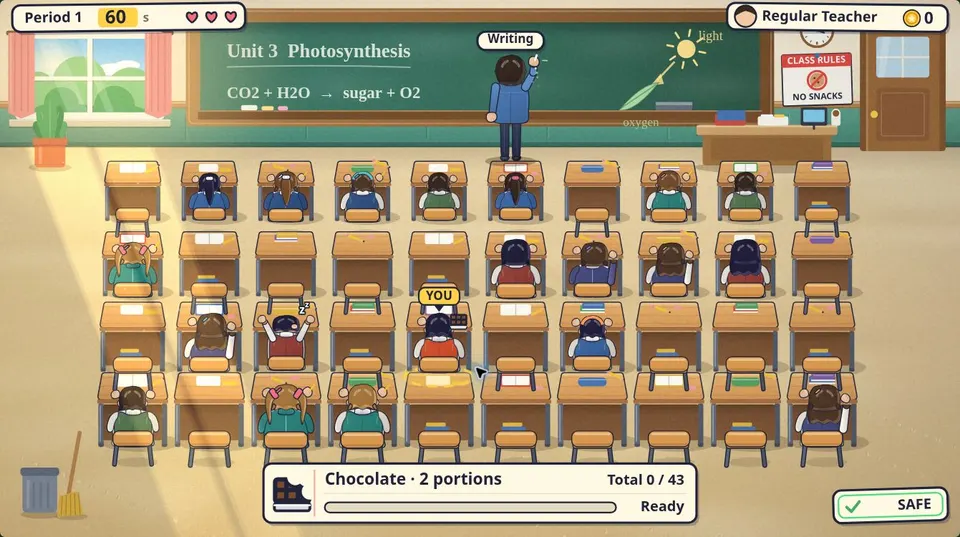
Sneak Eating Game is a classroom timing game. Watch the teacher, hold to eat a snack and release before the teacher confirms what you are doing. The current version shows the classroom from above, with your orange-clad student marked “YOU”. The teacher and the moving sight cone are visible at the front of the room.
The player at the top of this page loads automatically. Choose a difficulty and press Start once. The interface defaults to English; Chinese is available in Settings → Language. This page explains the controls and the numbers you need to follow. There is no installation or sign-up step.
How to play Sneak Eating Game
Hold to eat, release to stop. Hold Space, the mouse button on the game canvas, a finger on the classroom, or the Hold to eat button. Releasing pauses the snack without losing its progress. You can finish the same snack across several safe windows. A portion is counted only when the whole snack is finished, so an almost-complete snack does not yet contribute to the target.
Watch the teacher's sight cone. Yellow means an observing teacher has not started confirming an eating action. If the cone reaches you while you are eating, it immediately turns red and a confirmation countdown appears above the teacher. Stop eating before that countdown reaches zero. Looking at the snack bar alone can make you miss the first dangerous moment.
Stopping interrupts confirmation. Release the eating input or duck to interrupt the countdown. Suspicion fades gradually rather than resetting instantly. If you resume eating too quickly while the teacher is still watching, confirmation can finish sooner. The remaining time depends on the teacher, food, difficulty and classroom alertness; it is not a universal fixed number of seconds.
Duck to dodge chalk. Hold the Down arrow or the on-screen Duck (hold) button. You cannot eat while ducking. When chalk reaches the student, being down avoids that chalk hit. Ducking is not a free-roaming camera control: this version has no left/right glance or look-at-desk system.
Pause deliberately. Press P or Escape, or use the on-screen Pause button. The teacher and the lesson clock freeze together. Resuming preserves the classroom situation; it does not erase suspicion or reset the teacher. The game also pauses when it loses focus.
Finish the portion target and survive until the bell
A run lasts three lessons of 60 seconds each before any time-card extension. You begin with three hearts. To win, finish the difficulty's total portion target and keep at least one heart until the final bell. Reaching the target early is not an immediate win: you must still survive the remaining lesson time.
| Difficulty label | Total portions needed |
|---|---|
| 简单 — Easy | 25 |
| 普通 — Normal | 43 |
| 困难 — Hard | 45 |
| 极限 — Extreme | 49 |
The snack strip shows the current food, its portion value and your accumulated total. Gum contributes one portion, chocolate two and chips three. Larger unlockable foods contribute more. Finishing food also earns coins and builds a combo; portions and coins are separate numbers. The win target uses portions, not a target coin score.
Standing idle until the bell is not a win. You need to finish at least one snack during a lesson to receive that lesson's reward. If you reach the final bell alive but short of the portion target, the run still ends without a clear.
Warnings, punishment and the three hearts
The first confirmed detection is a warning rather than an immediate lost heart. Later confirmed detections can lead to thrown chalk, a standing penalty or confiscation. A chalk hit costs a heart unless avoided or blocked. Standing and confiscation can also cost a heart, and standing temporarily prevents eating. Confiscated food is replaced instead of being awarded as a completed snack.
Teacher behavior can vary between runs. Some teachers are stricter, some are less attentive, and the later lessons become more alert. Random classroom events can distract the teacher or make the room harder to sneak snacks in. Watch the current scene rather than memorizing a single safe eating duration.
Sneak Eating controls at a glance
| Action | Keyboard | Mouse or touch |
|---|---|---|
| Eat | Hold Space | Hold the classroom canvas or Hold to eat |
| Stop eating | Release Space | Release |
| Duck / dodge chalk | Hold Down arrow | Hold Duck (hold) |
| Pause / resume | P or Escape | Pause / Resume |
| Use a carried item | 1, 2 or 3 | Its button below the classroom |
F and the left/right/up arrows are not eating or camera controls in this version. On a narrow phone, landscape gives the classroom more room. The player remains within its own frame; use the page's Fullscreen control below it if your browser supports it.
Coins, the shop and local progress
The menu's Shop / Storage opens the shop and inventory. Coins from completed runs can unlock larger snacks or buy items. A run carries at most three items, and unused carried items return to inventory after a completed run. The settings screen, Settings, includes the sound toggle and volume control.
Coins, unlocked food, inventory and the best coin result are stored locally by this version of the game. An unfinished round is not restored after reloading. These are browser-local records, not an account or a worldwide leaderboard. Old records on the separate play subdomain are not automatically imported into this new player, and preview sandbox storage may be unavailable.
Your first round
- Choose Normal or Easy, then press Start.
- Take a short bite while the teacher writes, release, and verify the food progress stays.
- When the sight cone turns red, stop before the teacher's countdown ends.
- Practice holding Down for a chalk throw, then release it before eating again.
- Watch the cumulative portion target as the three lessons advance. A careful stop is better than losing the final heart for an unfinished bite.
For more practice ideas, read the classroom strategy guide. Prefer a growing snake instead? Try the separate Snake Eating Game or fruit snake game.
Sneak Eating Game: quick answers
What is the teacher game where you sneak snacks in class called?
It is called Sneak Eating Game. Hold to eat, release when the teacher turns, and reach your portion target by the final bell.
Do I need to download anything?
No. The classroom game loads automatically at the top of this page. Choose a difficulty and press Start. The interface defaults to English; Chinese is available in Settings → Language.
Can I play Sneak Eating Game on a phone?
Yes. Hold the classroom canvas or Hold to eat button to eat, release to stop, and hold Duck (hold) to duck. Portrait mode includes readable lesson and teacher status; landscape gives the classroom more room. The page's Fullscreen control is below the player; availability depends on your browser.
What is the goal of the new classroom game?
Finish three 60-second lessons, meet the total portion target, and keep at least one heart until the final bell. The targets are 25 on Easy, 43 on Normal, 45 on Hard and 49 on Extreme. Only completed snacks count toward portions.
Why does the teacher's sight turn red?
If an observing teacher's sight cone reaches you while you are eating, the cone turns red immediately and confirmation starts counting down. Release or duck before zero to interrupt it. Suspicion fades gradually, so resuming too quickly can leave less time.
Does every detection remove a heart?
No. The first confirmed detection is a warning. Later confirmations lead to punishments such as chalk, standing or confiscation. Start with three hearts, avoid chalk by ducking at impact, and keep at least one heart until the final bell.
Will my old progress transfer?
No automatic transfer is provided from the old play subdomain. This engine-hosted version stores its own coins, unlocked snacks, inventory and best coin result in browser-local storage. Unfinished runs are not restored. Clearing site data or changing browser can remove or separate these records.
What if the game does not load?
The player starts loading when you open the page. If loading fails, refresh and try again; an unfinished run will be lost. The website instructions remain available below the player. Browser restrictions can prevent scripts or local storage, especially in a sandboxed preview.
What gave you away?
Share a close call or a timing tip. Keep personal information and links out of your comment.
First out of class? Leave the first tip.